
DeckCP
Run your whole raise with DeckCP.
Your deck, your data room and your investor follow-ups, in one app.
Or drag a PDF or PowerPoint anywhere on this page. No signup. Get the Mac app
The right way to make a deck
Start from the deck you have, or the one you’re about to make.
A.
I already have a deck
- A.1
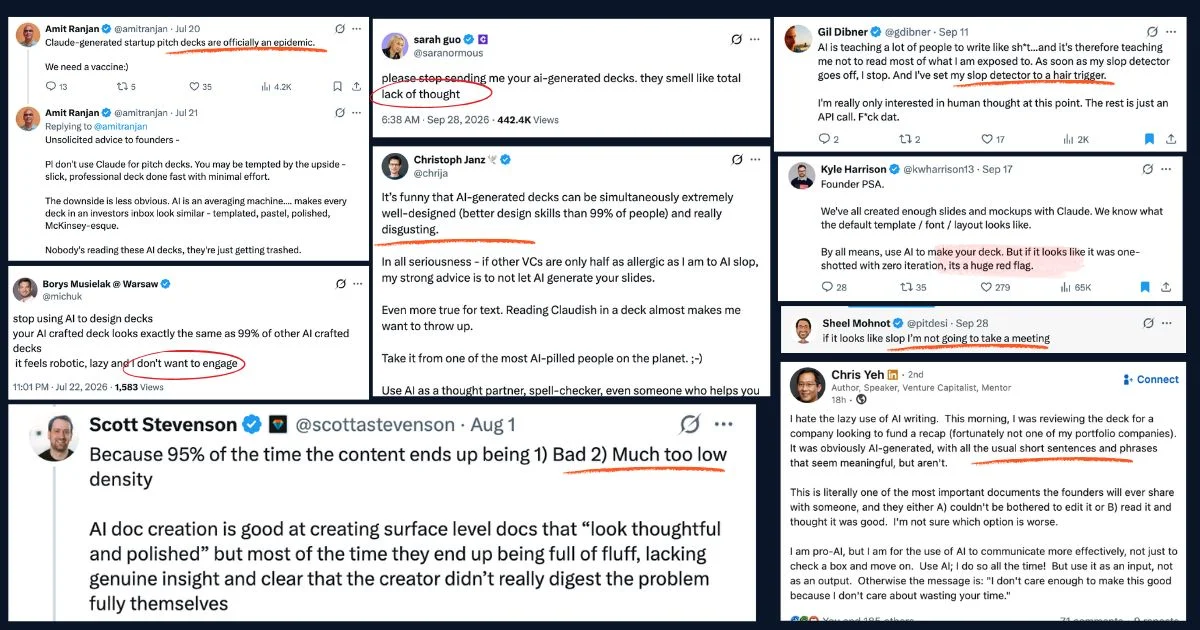
Did Claude write your deck? Investors can tell.
No one knows your business better than you. Let AI build the structure of the deck, then use the best editor to give it the hand polish your business deserves.
- A.2
Fix one slide without your AI redoing the other twenty.
Twenty slides. You type in one. The other nineteen don't move.
- A.3
Keep fixing it after you send it.
The link investors already have shows your newest version.
- A.4
No more pitch-v7-final.pdf.
pitch-v3.pdf
pitch-v5-final.pdf
pitch-v7-final-REAL.pdf
deckcp.com/you/seed
- A.5
If the import comes out wrong, a person fixes it by hand.
- A.6
Put your brand on it.
Paste your website address. Your colours, fonts and logo go onto the slides.
B.
I’m making a new deck
Step one
Use your AI to build a deck.
Works with any AI. Just connect the MCP.
The interview. Just type:
Step two
Polish the deck by hand.
- B.1
Agentic skills grill you before investors do.
The interview runs in your own AI and asks you what an investor will ask, before any slide is built.
- B.2
Approve the outline before any slide exists.
One point per slide. Reorder it while it's still a list.
- B.3
Investors can tell if an AI wrote your deck.
“It feels robotic, lazy and I don’t want to engage.”
Borys Musielak, on AI-made decks, on X - B.4
Your AI writes straight into the editor.
No export, no PDF in between.
- B.5
Works with Claude, ChatGPT and Gemini.
Connect once over MCP.
- B.6
You can even upload PDFs your AI built.
After the deck…
You’ll want analytics, and follow up, and you’ll need a data room.
Up and to the right
Your AI draws the first version. You make it yours.
Revenue, up and to the right
1. Revenue, up and to the right
The problem
2. The problem
How it works
3. How it works
Traction
4. Traction
The team
5. The team
The ask
6. The ask
With Maya Chen
Founder, Acme Health
LAYERS
PROPERTIES
Click any word on that slide and change it.
Analytics
See which slide lost them.
Time on every slide, who read to the end, and who's reading right now.
58
reads
62%
read to the end
2m 47s
average read
Seconds on each slide
Who read it
- 6m 12s
R. Mehta · Northbeam Capital
Read 3 times
- 1m 40s
L. Park · Example Ventures
Reading now
- 3m 05s
D. Kim · Seedline
Read to the end
- 0m 58s
A. Osei · Harbor Angels
Stopped at slide 7
Slide 7 is where they stop. Fix it first.
R. Mehta read it three times. Email him today.
This is time on the slide, not a tab left open.
Reading right now. Don't email yet.
Data room
I don't always use a data room. But when I do, I use DeckCP.
- It opens from a slide in your deck. Investors accept your NDA before they get in.
- Each investor gets their own link. Turn it off whenever you want.
- See which pages of each PDF they read, and who opened the cap table.
- An agentic data room spots mistakes and flaws before investors do.
Today, the agentic part means your own AI reads the room over MCP, and the room logs the questions it couldn't answer.
Seed round · data room
NDA onLinks
Northbeam Capital
Model: pages 1–9 of 12
Example Ventures
Opened the cap table
Seedline
Link turned off
Follow-up
The investor who read it three times is waiting for your email.
R. Mehta · Northbeam Capital
Read it 3 times · 6m 12s
D. Kim · Seedline
Read to the end · 3m 05s
A. Osei · Harbor Angels
Stopped at slide 7 · 58s
- Follow-ups go out from your own Gmail.
That button goes on the last slide and opens your Calendly or cal.com page.
Voice and the Mac app
Say the change and watch the slide update.
Your words go into the Copilot's prompt. You see the edit before anything is saved.

Drop a PDF on the Dock icon and start editing.
DeckCP for Mac has its own window in ⌘-Tab, lets you drag a slide from one open deck into another, is signed by Apple, and updates itself.
Download for MacPricing
Free for everyone, for now.
When paid plans start, this is what they'll be.
Free
$0
- ·Import, the editor and the live link
- ·Reads on every slide
- ·One data room
Raise Pass
$29for six months
- ·For first-time founders, by application
- ·Includes the AI data room
- ·A person fixes a bad import by hand
AI data room
$99per person, per month
- ·Investors ask the room, and it answers from your files
- ·Every question logged for you
Drop your deck here.
PDF or PowerPoint. Drag it anywhere on this page. No signup.
Why
Let AI build 70% of the deck. You build the last 30%.
No one knows your business better than you. The last 30% is where investors can tell who wrote it.
First raise? Start by dropping your deck here.
PDF or PowerPoint. Drag it anywhere on this page. No signup.